

.webp)

.svg)


How to Register Daikin Equipment Before Winter
Are You Risking Your Heating Coverage Just as the Cold Weather Arrives?
Are you wondering how to register your Daikin equipment to ensure full warranty coverage before winter? You are certainly not alone. Here at the Daikin Seattle Experience Center in Tukwila, a pattern we see often every September is homeowners completing a late-summer installation and simply forgetting the final, most crucial administrative step. As the early fall transition to heating season begins, the window to protect your investment is actively closing. The manufacturer requires you to log your new system in their database within a very specific timeframe. Missing this deadline has severe, long-term consequences for your coverage, potentially leaving you responsible for major repair costs just when you need your heating system the most.
Taking a few minutes to complete this process guarantees that your new Daikin HVAC systems are fully backed by the factory. Whether you installed a traditional furnace setup or a highly efficient Daikin heat pump, completing your registration is the only way to unlock the maximum protection available for your equipment.
Understanding the Strict 60-Day Daikin Registration Deadline
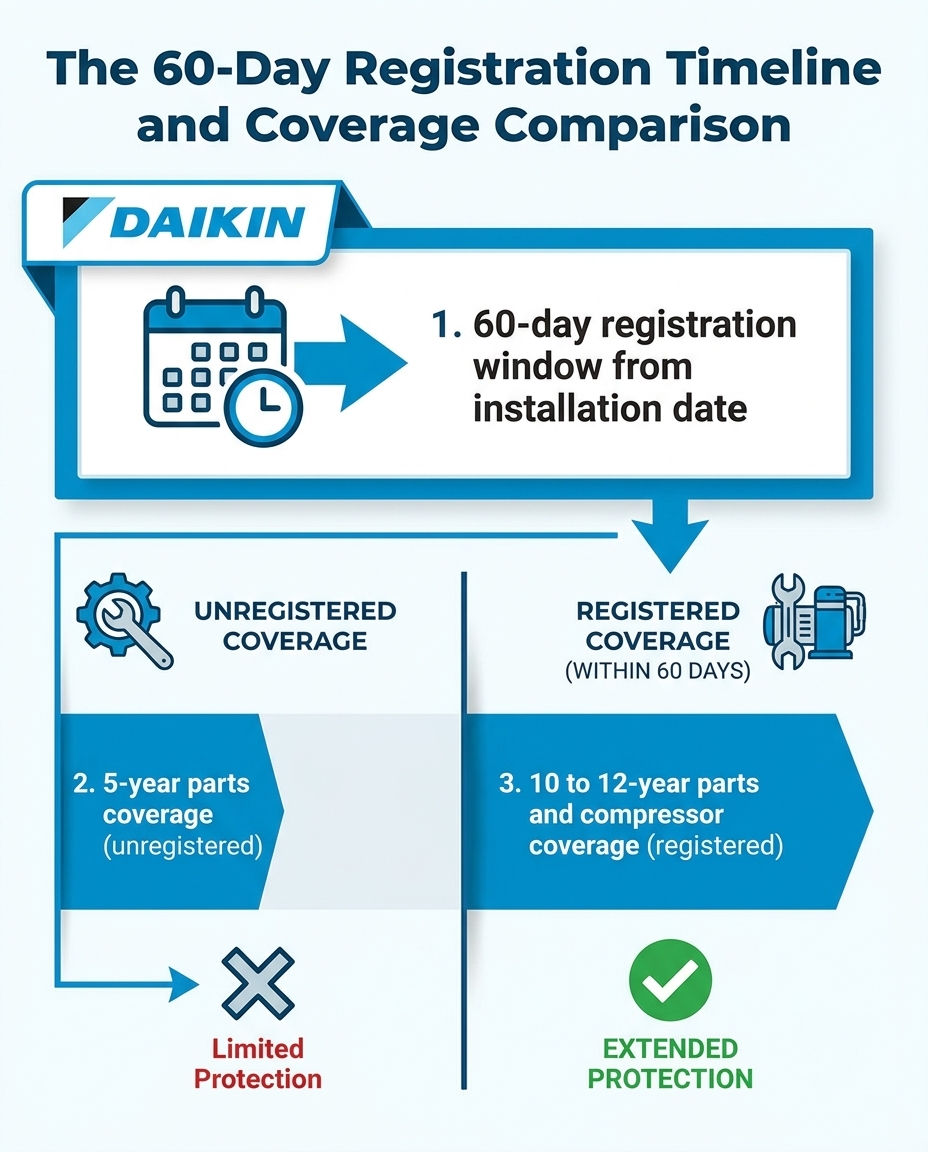
The most important rule to remember is the strict 60-day deadline. The manufacturer requires all new systems to be registered within 60 days of the installation date. This countdown begins the day the equipment is physically installed in your home, not the day you signed the contract or paid the deposit. If you miss this 60-day window, your equipment automatically defaults to the base out-of-the-box warranty.
For most Daikin heat pump and air handler systems, the base warranty provides 5 years of parts coverage. However, by simply completing the online registration within the 60-day window, that coverage extends up to 10 or 12 years for parts and the compressor, depending on your specific model tier. This is a massive difference in long-term value.
• Parts Warranty — Unregistered (Base Warranty): 5 Years — Registered (Within 60 Days): 10 to 12 Years
• Compressor Warranty — Unregistered (Base Warranty): 5 Years — Registered (Within 60 Days): 10 to 12 Years
• Unit Replacement — Unregistered (Base Warranty): Not Included — Registered (Within 60 Days): Up to 12 Years (Select Models)
We often see homeowners realize they missed this deadline only after a breakdown occurs. Just as decoding your Daikin AC warranty was important during the summer cooling season, securing your heating warranty is vital before the winter chill sets in. Our team constantly reminds local homeowners that the manufacturer strictly enforces this 60-day rule, making it non-negotiable for anyone wanting maximum protection.
Essential Documentation to Gather Before Logging In
Before you sit down at your computer to navigate the portal, gather all your necessary documents. The online system will time out if left idle for too long, so having your information organized in advance prevents frustration.
Locating Your Contractor Information
You will need the final installation invoice provided by your HVAC contractor. This document contains the exact date of installation, the contractor's official business name, and their contact information. While gathering your paperwork, our team also recommends checking with your local utility or a tax professional to see if generally applicable energy incentive programs or federal tax credits apply to your qualifying heat pump installation. Understanding who installed your equipment is critical. For example, at our Tukwila showroom, we recently had a homeowner visit during the winter without heat due to a previous contractor's poor work. Our staff patiently explained different heat pump and air handler options and helped locate reputable local contractors to correct the issues. This highlights why having your trusted contractor's details properly documented and tied to your warranty is so important.
Finding the Physical Data Plates
Next, you must locate the serial and model numbers on the equipment itself. Do not rely solely on the invoice, as paperwork can sometimes contain typos. You need to verify the numbers directly on the units.
• Outdoor Condenser: Look for a silver or white data plate sticker on the side or back panel of the outdoor unit.
• Indoor Air Handler or Furnace: Check the front panel or inside the main service door for the corresponding data plate.
• Thermostat: Some advanced thermostats also require registration and have a serial number on the back plate or within the digital settings menu.
The quick fix: Take clear photos of these data plates with your smartphone. This allows you to zoom in on the small text and ensures you type the alphanumeric codes perfectly into the portal.
Step-by-Step Guide: Navigating the Manufacturer Registration Portal
Once you have your invoice and photos of your data plates, you are ready to begin the registration process. Follow these sequential steps to ensure your equipment is logged correctly.
Step 1: Access the Official Portal
Navigate to the official Daikin Comfort warranty registration website. Ensure you are on the manufacturer's direct site, not a third-party distributor page. Look for the "Warranty Registration" link, usually located in the top navigation menu or the footer of the homepage.
Step 2: Account Creation or Guest Checkout
The portal will ask if you want to create a homeowner account or proceed as a guest. Creating an account is highly recommended. It allows you to log back in years later to verify your coverage status, download duplicate certificates, or transfer the warranty if you sell your home. If you choose the guest route, you must save your confirmation emails meticulously.
Step 3: Input Contractor and Installation Details
Enter your installing contractor's information exactly as it appears on your final invoice. You will need their business name, phone number, and address. Next, input the installation date. Remember, the system uses this specific date to calculate your 60-day window.
Step 4: Enter Equipment Serial and Model Numbers
This is the most critical step. Carefully type in the serial and model numbers for every piece of equipment installed.
1. Enter the outdoor heat pump or air conditioner details first.
2. Add the indoor air handler or gas furnace details next.
3. Include any registered accessories, such as smart thermostats or indoor air quality monitors.
Double-check every character before clicking submit. A single typo can cause the system to reject the entry.
Step 5: Download and Save Your Certificate
After successfully submitting the information, the portal will generate a final warranty certificate. Download this PDF immediately. Print a physical copy and staple it to your original installation invoice. Store these documents in a safe place with your other important home records.
Troubleshooting Common Portal Pitfalls and Errors
Even with careful preparation, homeowners sometimes encounter friction points during the online registration process. In our years of helping Pacific Northwest homeowners at the Daikin Seattle Experience Center, we maintain a strong commitment to transparent customer education, helping you easily navigate these exact strict portal requirements.
The "Serial Number Not Found" Error
The Problem: You type in your serial number, but the portal flashes a red error message stating the equipment cannot be found.
The Cause: This is almost always a simple alphanumeric typo. The most common mistake is confusing the letter "O" with the number "0", or the letter "S" with the number "5".
The Solution: Refer back to the close-up photos you took of the data plates. Look closely at the font structure. If the error persists, contact your installing contractor to verify the numbers they recorded in their inventory system.
Contractor Not Listed in the Dropdown Menu
The Problem: You begin typing your installer's name, but they do not populate in the portal's search directory.
The Cause: The contractor might be operating under a different legal corporate name, or they may be a newly established business not yet synced with the manufacturer's database.
The Solution: Check your invoice for an LLC or Inc. name that differs from their marketing name. If you still cannot find them, the portal usually provides an option to manually enter a contractor's details. Fill out all the required fields manually to proceed.
Registering Multi-Zone Systems
The Problem: You have one outdoor unit but several indoor wall units, and you are unsure how to enter them all.
The Cause: Multi-zone ductless systems require every individual component to be registered separately to receive full coverage.
The Solution: Use the "Add Another Unit" button in the portal. You must enter the serial and model number for the single outdoor compressor, and then repeat the process for every single indoor head unit installed in your home. Do not leave any indoor units off the registration.
Why Maximum Warranty Coverage Matters for Pacific Northwest Winters
Completing this administrative task is about more than just checking a box; it is about securing reliable comfort for your home. With the reality of long, damp, chilly Seattle winters, reliable heating is non-negotiable. Your heating system works incredibly hard during these months, running continuously to strip moisture from the air and maintain a comfortable indoor temperature.
The Strain of Continuous Winter Operation
Throughout the Seattle and Tukwila area, the winter climate places a unique strain on heat pumps and air handlers. Our team knows firsthand that the constant cycling required to combat near-freezing temperatures and high humidity means your system's internal components are working at peak capacity. This heavy workload increases the natural wear and tear on moving parts like blower motors and compressors.
Protecting Your Investment
Extended warranty coverage protects you from unexpected out-of-pocket repair costs during these peak usage months. During the peak of a recent winter, a customer needed a new home heating system and visited our Tukwila showroom to get pre-purchase demos of the Daikin Fit system. After receiving a list of qualified HVAC companies from our staff, their system was installed and provided exceptional, quiet heating. Securing the 12-year registered warranty ensures that this level of comfort remains uninterrupted. If a severe winter breakdown occurs, knowing your system is fully backed by the manufacturer provides incredible peace of mind.
Having maximum coverage also ensures you can quickly access Seattle heat pump solutions from authorized technicians who can order factory-direct replacement parts under warranty, minimizing your downtime during a cold snap.
In-Depth FAQ: Daikin Warranty Registration and Coverage Terms
What happens if I miss the 60-day Daikin registration window?
If you miss the 60-day registration window, your equipment automatically defaults to the base warranty term. For most systems, this means your parts warranty drops drastically from 10 or 12 years down to just 5 years. The manufacturer strictly enforces this deadline, and exceptions are rarely granted. Registering on time is the only way to secure the extended coverage.
How do I find my Daikin serial number?
You can find your Daikin serial number on the physical data plate attached to your equipment. Locate the sticker on the side or back panel of the outdoor condenser, and check the front or side of the indoor air handler. Look for the alphanumeric code clearly labeled "Serial No." or "S/N" and take a photo of it for easy reference.
What does the Daikin mini split warranty cover?
The registered Daikin mini split warranty covers internal functional parts and the compressor against manufacturing defects. It requires the system to be installed by a licensed professional to remain valid. However, it does not typically cover routine maintenance items like air filters, remote control batteries, or damage caused by external factors like power surges.
How long is the Daikin warranty?
The base Daikin warranty provides 5 years of coverage for parts. If you register the equipment within 60 days of installation, the warranty extends up to 10 or 12 years, depending on the specific model tier you purchased. Additionally, select high-efficiency models offer unit replacement warranties that can also extend up to 12 years if properly registered.
Is the Daikin warranty transferable to a new homeowner?
Daikin warranties are generally tied to the original purchaser of the equipment. In some specific cases, a base 5-year warranty may transfer to a new homeowner, but the extended 10 or 12-year registered terms typically do not. You should check the specific documentation for your exact model to understand the precise transferability clauses.
Does my warranty cover labor costs?
Standard manufacturer warranties cover the cost of replacement parts only, not the labor to install them. Labor warranties are typically provided separately by the installing contractor who put the system in your home. Extended labor plans may be available for purchase through your contractor at the time of installation, but they are separate from the manufacturer's parts warranty.
Secure Your Peace of Mind Before the Fall Transition Ends
Do not let the 60-day window slip away after your late-summer installation. Gathering your documents and completing the online registration today is the most effective way to protect your home comfort investment. If you need help understanding your specific system components or navigating the warranty terms, reach out to our local experts at the Daikin Seattle Experience Center for guidance. Secure your coverage now, and enjoy the upcoming winter with total peace of mind.
Schedule a Visit

your individual indoor comfort needs
products firsthand
with an authorized Daikin Dealer
.webp)
See why our customers Choose Us

“Jem is very inviting and knowledgeable. She gave us a walk through of the Daikin Experience Center and patiently answered all our questions. Learned a lot about HVAC’s through this visit.”
“Jem did a great job walking us through the various Daikin products and efficiencies of the products. She was very knowledgeable on everything Daikin. Highly recommend coming in for a tour prior to picking out your various AC systems.”
“Great experience at Daikin Seattle Experience Center: pre-purchase demos of home heating system (Daikin Fit), list of HVAC companies, working Daikin staff and external contractors to ensure highest quality. This experience sets the bar of how any home HVAC experience should be. Have got the Daikin Fit installed and so far seems to work very well – quiet, good home heating in peak winter (heat transfer/BTU/air handling); Functionality of Daikin thermostat and the iPhone app makes it very easy to use.”
“This place is awesome! If you are in the market for a new HVAC system, visit the Daikin Experience Center to get educated on the newest technology as well as available rebates and incentives for where you live. They’ll even connect you with local contractors in your area who install Daikin equipment.”
