


Why Understanding How the Daikin One Plus Communicates Directly With Your Daikin System Matters for Your Home Comfort
How the Daikin One Plus communicates directly with your Daikin system comes down to a dedicated two-wire data connection — called Data 1 and Data 2 — that runs between the thermostat, your indoor unit, and your outdoor unit. This creates a true two-way conversation, not just a one-way signal.
Here's a quick overview of how it works:
- The Daikin One+ sends commands to your HVAC equipment through the Data 1 and Data 2 wires
- Your equipment sends real-time feedback back to the thermostat through the same connection
- A healthy communication network shows a bias voltage of 0.6 VDC between those two wires
- For S21-based mini-split or multi-split systems, a translation adapter bridges the connection
- For VRV and SkyAir systems, the thermostat connects via a P1P2 daisy chain supporting up to 16 indoor units
- Wi-Fi and cloud connectivity extend that communication to your smartphone, Amazon Alexa, and Google Assistant
Most smart thermostats only send commands — they can't hear back from the system. The Daikin One+ is different. As the first smart thermostat to offer full two-way communication with nearly all Daikin ducted and ductless HVAC systems, it works more like a conversation than a remote control. That means your system can run more precisely, respond to real conditions, and flag problems before they become bigger issues.
If you're a Seattle-area homeowner dealing with uneven temperatures, high energy bills, or a system that just doesn't seem to know what it's doing, understanding this communication layer is the first step toward a smarter, more efficient home.
Simple how the daikin one plus communicates directly with your daikin system word guide:
The Science Behind How the Daikin One Plus Communicates Directly With Your Daikin System
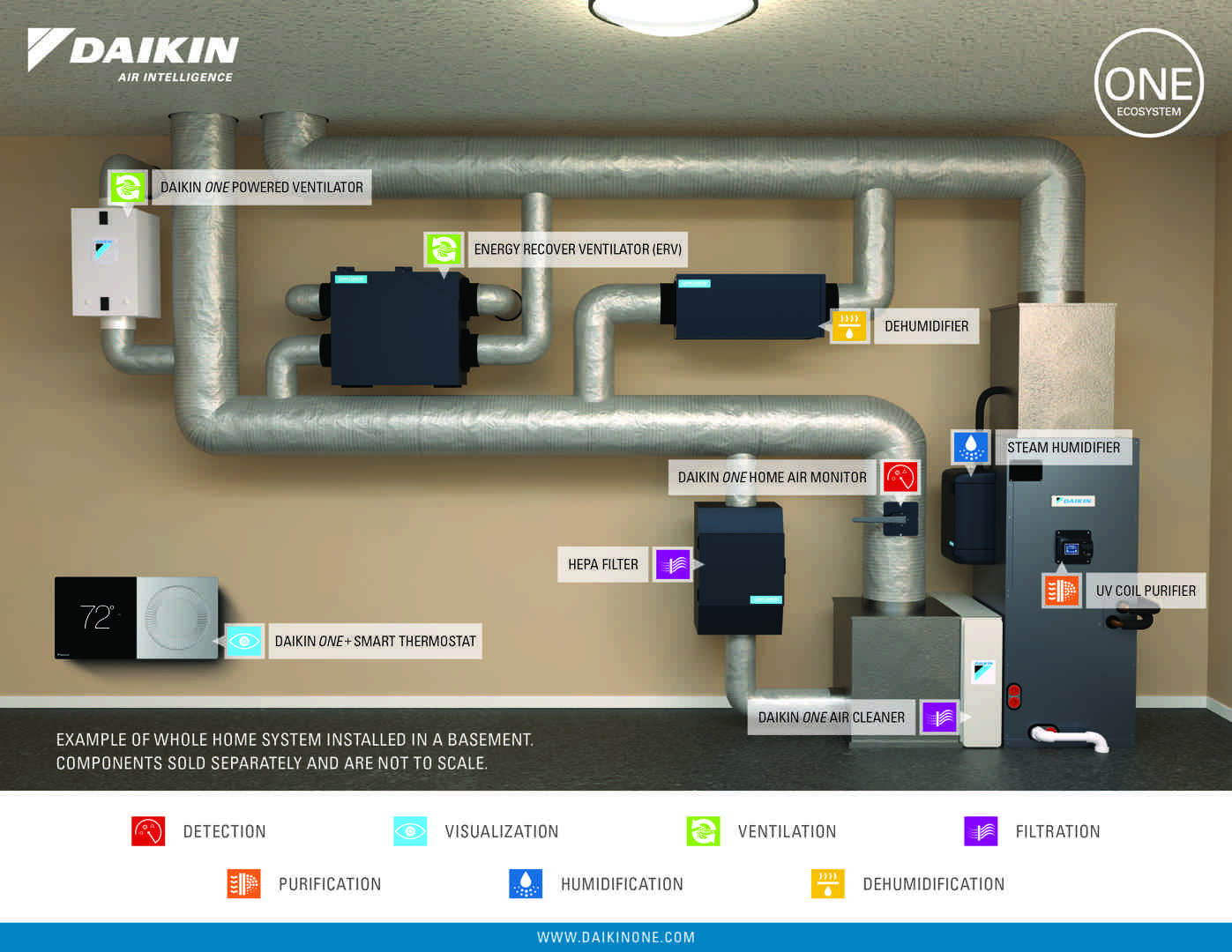
To truly appreciate the engineering behind the Daikin One+ smart thermostat, we have to look past its beautiful high-resolution touchscreen and anodized aluminum bezel. The magic lies in the physical and digital connections that occur behind your walls.
When we install a Daikin One+ in a home in the Pacific Northwest, we aren't just hooking up a switch that clicks on and off. We are establishing a highly sophisticated, bi-directional communication network. In standard legacy HVAC setups, a thermostat acts like a simple traffic cop waving a stop or go sign. It sends 24-volt electrical signals down dedicated wires to turn heating or cooling on or off. The system has no way to talk back, report its current running capacity, or share diagnostic data.
By contrast, how the daikin one plus communicates directly with your daikin system involves continuous, high-speed data transmission. The thermostat, the indoor air handler or furnace, and the outdoor heat pump or air conditioner share a digital language. They constantly exchange data packets containing temperature readings, humidity levels, airflow rates, and system diagnostics.
This direct communication allows you to enjoy the full array of Daikin One Plus Smart Thermostat Benefits, transforming your HVAC setup from a collection of separate appliances into a unified, intelligent climate control network.
Understanding the Two-Way Communication Protocol
This bi-directional protocol is the secret ingredient that makes Daikin's smart inverter technology so incredibly efficient. Inverter compressors are designed to ramp up or down incrementally, matching your home’s heating or cooling needs with extreme precision rather than running at 100% capacity or turning off entirely.
To do this effectively, the outdoor inverter compressor needs to know exactly what is happening inside your home. The Daikin One+ acts as the brain of this ecosystem. It doesn't just tell the outdoor unit, "Hey, it's warm in here, turn on." Instead, it says, "The indoor temperature is 0.8 degrees above the setpoint, indoor humidity is at 52%, and the temperature is rising slowly. Please run at 28% capacity to maintain perfect balance."
The indoor and outdoor units then send back operational data, verifying that the system is responding correctly. This continuous feedback loop ensures system synchronization, prevents temperature swings, and dramatically reduces wear and tear on your equipment. It is a textbook example of How Daikin Technology Creates a Self-Managing Comfort Ecosystem that keeps your home at the exact temperature you want while using the absolute minimum amount of energy.
Wiring Specifications for Unitary Systems
For residential unitary systems (such as a Daikin Fit heat pump paired with a communicating gas furnace or air handler), the physical connection is remarkably elegant. It relies on a simple four-wire connection:
- Data 1 (Terminal 1): The primary data transmission wire.
- Data 2 (Terminal 2): The secondary data transmission wire.
- Common (C Terminal): Provides the electrical ground pathway.
- Power (R Terminal): Delivers 24 VAC power from the indoor unit to the thermostat.
Because this is a digital network, the quality and length of the wiring are critical. We use solid 18-gauge copper wire to ensure clean data transmission. The maximum allowable wire distance between the Daikin One+ and the indoor unit is 125 feet. Exceeding this distance can cause signal degradation, leading to communication lag or intermittent connection drops.
When properly wired, a technician can measure the electrical properties of the Data 1 and Data 2 lines. A healthy, robust communication network will register a steady bias voltage of 0.6 VDC. This tiny, precise voltage reading indicates that the data lines are properly balanced, preventing data collisions and ensuring the thermostat can process high volumes of information without lock-ups.
Hardware Requirements: S21 vs. P1P2 Communication Paths
Not all Daikin indoor units use the exact same internal communication language. Depending on whether you have a ducted central system, a ductless mini-split, or a larger multi-zone VRV (Variable Refrigerant Volume) system, the path the data takes will vary.
Understanding these pathways is essential for proper integration, especially when pairing the thermostat with advanced indoor air quality accessories. You can learn more about how these components interface by reading about How the Daikin IAQ System Works with Your Heat Pump or Ductless Unit.
S21 Interface and Translation Adapters
Daikin's popular single-zone and multi-zone ductless mini-splits typically utilize a communication standard known as the S21 interface. To allow the Daikin One+ to communicate directly with these S21-based indoor units, a translation adapter is required.
The translation adapter acts as a bilingual interpreter. On one side, it plugs directly into the S21 port on the indoor unit's control board. On the other side, it provides the standard four-wire connection (1, 2, C, R) to run to the Daikin One+ thermostat. This adapter can be mounted discreetly inside the indoor unit's piping chase or directly onto the surface of the casing.
By utilizing this translation adapter, homeowners with ductless systems can enjoy the exact same high-end smart control, air quality monitoring, and scheduling features as those with large central ducted systems. This is a game-changer for historic homes in Seattle where ductless systems are common but smart, centralized control is highly desired. For a deeper dive into how this fits into your home's air quality, check out our Daikin One Indoor Air Quality Guide Kent WA.
P1P2 Bus for VRV and SkyAir Systems
For light commercial systems, larger residential estates, or multi-zone ductless applications, Daikin utilizes the P1P2 communication bus. This is a highly robust, two-wire, non-polarized protocol that has been a staple of Daikin's commercial-grade VRV and SkyAir systems for decades.
When connecting the Daikin One+ to a P1P2 system, the wiring requirements change:
- Daisy Chain Connectivity: The P1P2 bus allows you to daisy-chain up to 16 indoor units to a single Daikin One+ thermostat.
- Extended Distance: Because the P1P2 protocol is designed for larger buildings, it supports a massive maximum wire length of up to 1,640 feet using 18-gauge, solid, non-shielded cable.
- Backward Compatibility: This bus allows the modern Daikin One+ to remain backward compatible with older P1P2-compliant indoor units, making it an excellent upgrade option for older VRV systems in the Seattle area.
Because the P1P2 bus is non-polarized, technicians don't have to worry about accidentally reversing the wires during installation, making the physical setup incredibly reliable.
Advanced Configurations: Multi-Unit Control and Auxiliary Setup
When dealing with larger homes or multi-zone systems, the way the Daikin One+ manages communication becomes even more fascinating. It isn't just managing a single zone; it is coordinating a complex symphony of heating, cooling, and ventilation. To see how all these pieces fit together, take a look at How Daikin Connected Home Technology Works Together.
Mode Master Logic in VRV Systems
In a multi-zone VRV system, multiple indoor units are often connected to a single outdoor heat recovery or heat pump unit. This introduces a potential conflict: what happens if one family member wants cooling in the upstairs bedroom while another wants heating in the basement?
To prevent the system from fighting itself, Daikin utilizes "Mode Master" logic:
- The Mode Master Unit: One designated indoor unit is set as the "Mode Master." This unit has the authority to determine the primary operating mode (Heating, Cooling, or Fan Only) for that branch of the system.
- Master Controlled Units: The remaining indoor units in the group are "Master Controlled." They can turn their individual fans or valves on and off to adjust local temperatures, but they must operate within the mode dictated by the Mode Master.
- Conflict Resolution: If a master controlled unit requests heat while the system is locked in cooling mode, the Daikin One+ will display a message explaining the conflict, or, if configured with auxiliary heat, engage local auxiliary heat while the rest of the system continues to cool.
Through the remote controller or thermostat interface during commissioning, technicians can assign up to 64 unique group addresses (controlling up to 128 indoor units) per intelligent Touch Manager (iTM) or Building Management System (BMS) gateway, ensuring flawless communication across massive residential layouts.
Configuring Auxiliary Outputs (Aux1/Aux2)
The Daikin One+ isn't limited to controlling Daikin equipment; it can also communicate with third-party accessories like whole-home humidifiers, dehumidifiers, and fresh air ventilation systems. This is done using the thermostat's auxiliary outputs (Aux1 and Aux2).
To protect the thermostat's sensitive electronic board, an isolation relay must be installed between the auxiliary device and the thermostat. This relay acts as a physical barrier, allowing the Daikin One+ to safely switch the auxiliary accessory on and off using standard low-voltage signals.
Once wired, the auxiliary outputs can be fully customized through the installer configuration wizard. For example, in the dry winter months of the Pacific Northwest, you can program the thermostat to automatically engage your humidifier whenever the indoor relative humidity drops below your target comfort level, running the system fan concurrently to distribute moisture evenly throughout your home.
Troubleshooting Communication Errors and Network Issues
Even the most advanced systems can occasionally experience a hiccup. When a communication error occurs, the Daikin One+ is designed to make diagnostics as simple as possible.
| Error Code | Potential Cause | Common Solution |
|---|---|---|
| E11 | Thermostat cannot find the indoor unit during commissioning. | Verify wiring integrity on terminals 1 and 2; check for 24 VAC power. |
| U4 | Communication error between the indoor and outdoor unit. | Check the F1/F2 or 1/2 communication loop; ensure the outdoor unit has power. |
| UF | Improper wiring configuration or reversed data lines. | Double-check polarity on unitary systems; verify bias voltage. |
| Blank Screen | Total loss of power to the thermostat. | Check the indoor unit's low-voltage fuse; verify R and C terminal connections. |
Step-by-Step Voltage and Bias Diagnostics
If your thermostat displays a communication error, the first thing a technician will do is pull out a multimeter to perform a voltage check. This is the fastest way to isolate a physical wiring issue from a software configuration problem.
- Check Power (R to C): There should be a steady 24 VAC reading between the R (power) and C (common) terminals. If this voltage is missing, the issue lies with the indoor unit's transformer, control board fuse, or a tripped float switch.
- Check Bias Voltage (Data 1 to Data 2): Set your multimeter to DC volts and measure the reading between terminals 1 and 2. A healthy, active network will read exactly 0.6 VDC.
- Addressing Low Bias Voltage: If the reading is significantly lower than 0.6 VDC, the communication signals may be getting lost in electrical noise. Technicians can check the TERM Dip-Switch (DS1) on the outdoor unit’s main control board. Flipping this switch can apply a terminating resistor to the line, cleaning up the signal and restoring the robust 0.6 VDC bias voltage.
How the Daikin One Plus Communicates Directly With Your Daikin System After a Power Outage
Winter storms in Washington State can sometimes cause brief power outages or voltage fluctuations. When power is restored, your HVAC system must perform a coordinated startup sequence.
Occasionally, a sudden power interruption can cause the thermostat to lose its connection to the indoor or outdoor unit, resulting in a persistent communication error or a temporary loss of certain operating modes (like cooling). If this happens, follow these simple reset steps:
- Perform a Complete Power Down: Go to your home's main electrical breaker panel. Locate the breakers for both your indoor unit (furnace/air handler) and your outdoor unit (heat pump/AC). Flip them both to the "OFF" position.
- Wait Ten Minutes: Keep the system completely powered down for at least 10 minutes. This allows all the capacitors on the system's control boards to fully discharge, wiping out any corrupted temporary memory.
- Restore Power: Flip the breakers back to the "ON" position.
- Allow Equipment Discovery: Do not touch the thermostat for 5 minutes. During this time, the Daikin One+ will initiate a system-wide equipment discovery scan, re-establishing its digital handshake with the indoor and outdoor units. The E11 error code should clear, and your full system functionality will be restored.
Cloud Connectivity and Smart Home Integration
While the physical wires handle the critical second-by-second operations of your heating and cooling equipment, the Daikin One+ also communicates outward to the digital world. By connecting to your home's Wi-Fi network, the thermostat transforms into a cloud-connected comfort hub. To explore this in more detail, read about our Daikin One Cloud Integration Seattle solutions.
Remote Control and Mobile App Pairing
Connecting your Daikin One+ to your smartphone is a straightforward, secure process:
- Wi-Fi Connection: Navigate to Settings > Configuration > Home Wi-Fi on your thermostat, check "Use Wi-Fi," and select your local 2.4GHz network.
- App Pairing: Download the Daikin One Home mobile app, create an account, and select "Add Location." The thermostat will generate a secure, six-digit pairing code that remains valid for 15 minutes. Input this code into your app to link the devices.
- Smart Features: Once connected, you can utilize advanced features like geo-fencing (which automatically lowers your heating or cooling settings when you leave a custom radius around your home) and receive automatic, over-the-air software updates.
This connection also allows you to monitor your home's indoor air quality in real-time. Learn more about this by reading How Daikin One Plus Air Quality Monitoring Protects Your Family.
How the Daikin One Plus Communicates Directly With Your Daikin System via Voice Assistants
Once your cloud account is established, you can easily link your Daikin One+ to your favorite voice assistants. By enabling the Daikin skill in the Amazon Alexa or Google Home app, you can control your home's climate using simple voice commands.
When you say, "Alexa, set the living room to 72 degrees," the command travels from your smart speaker to the Amazon cloud, securely authenticates with the Daikin cloud database, sends a digital instruction down to your home's Wi-Fi router, and passes it directly to your thermostat. The Daikin One+ then translates that instruction into a digital data packet and sends it down the Data 1 and Data 2 wires to ramp up your inverter heat pump. This entire process happens in less than a second!
Frequently Asked Questions About Daikin One+ Communication
What is the maximum wire distance for Daikin One+ communication?
For standard residential unitary systems using a four-wire connection, the maximum wire distance between the Daikin One+ and the indoor unit is 125 feet using solid 18-gauge wire. For larger VRV or SkyAir systems utilizing the P1P2 communication bus, the maximum daisy-chain wire length is 1,640 feet using solid, non-shielded 18-gauge wire.
How do I verify that my thermostat has a healthy communication network?
You can verify network health by testing the DC voltage between the Data 1 and Data 2 terminals on the back of the thermostat or at the indoor unit's terminal strip. A healthy, active, and properly balanced communication network will display a steady reading of 0.6 VDC.
Can the Daikin One+ control non-communicating auxiliary accessories?
Yes. Using the built-in Aux1 and Aux2 terminal outputs, the Daikin One+ can control third-party accessories such as whole-home humidifiers, dehumidifiers, and fresh air ventilation systems. To protect the thermostat's circuitry, an isolation relay must be installed between the thermostat and the accessory.
Conclusion
The Daikin One+ smart thermostat is far more than a sleek wall accessory; it is the central command center for your home's entire comfort ecosystem. By establishing a direct, bi-directional communication path with your Daikin inverter system, it ensures unmatched temperature precision, lower energy bills, and a healthier indoor environment.
At Daikin Seattle, we are proud to serve families across Tukwila, Seattle, and the wider Pacific Northwest. We invite you to visit our unique Pacific Northwest Daikin Experience Center in Seattle, where you can interact with these advanced technologies and see exactly how smart climate control can transform your daily life.
Are you ready to experience the ultimate in home comfort and efficiency? Discover our Interactive Daikin Climate Control Solutions or take the next step toward a smarter home today and Schedule a smart HVAC consultation in Renton with one of our local home comfort experts!